


Comix
0.00.00 Reviews
App Specs
- Version
- 1.0.0
- Updated On
- License
- Free
- Downloads
- 10,000+
- Developer
- VerityLabsCodes
- Categories
- Comics
- Platform
- Android
Screenshots




 Analysis by AppCompare
I’m cautious about comic apps that make a strong first impression but give me no reason to return once I’ve browsed the opening screen. Comix has a more practical idea at its core: help me find comics, keep an eye on what I’m reading, and make it easier to pick up where my interests lead next. That gives it a useful role for readers who want a lightweight discovery and organizing tool, rather than a whole comic-reading ecosystem.
Before deciding whether it deserves a place on my phone, I’d give it a specific job. I wouldn’t expect one app to replace every publisher, store, or reader I already use; I’d ask whether it makes the gap between hearing about a comic and remembering to explore it any smaller. That is a modest test, but it is also the kind of everyday usefulness that can survive after the first burst of curiosity.
Comix is a free comics app from VerityLabsCodes, currently at version 1.0.0 and rated for Everyone. Its focus is simple enough to understand: discover what is trending, search for titles, and keep a reading shelf. I find that combination promising because choosing what to read and remembering what has caught my attention are everyday problems, even for people who already know where they get their comics.
Where the first week feels useful
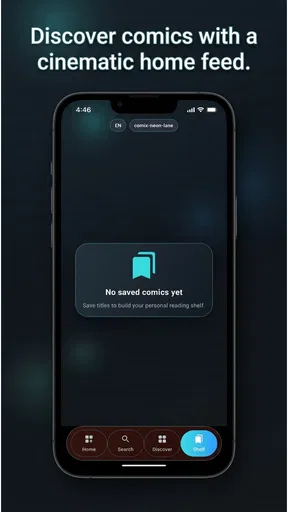
The early appeal is the short path from curiosity to a candidate read. A trending area can give me somewhere to start when I don’t have a particular series in mind, while search is more useful when I do. The shelf adds a personal layer: instead of treating each visit as a fresh hunt, I can use it to keep track of titles I want to revisit. Those three jobs fit together better than a list of recommendations alone.
For a realistic example, imagine I have ten minutes on a lunch break and want to find something new without scrolling through a general web search. I can check what is currently drawing attention, search a name I heard from a friend, and save an interesting result to my reading shelf for later. That workflow is modest, but it addresses the decision-making friction that often stops a casual reader from starting anything at all.
One useful habit is to treat the shelf as a shortlist rather than a permanent archive. When I come across several possibilities in one sitting, saving only the ones I genuinely expect to try keeps the list meaningful. This is especially helpful if I browse in brief bursts: I can collect candidates during spare moments, then choose one when I have more time to read elsewhere or explore further.
There is also a sensible distinction between browsing by popularity and searching with intent. Trending discovery is a prompt, not a guarantee that a comic will suit my taste. If I already know the genre, creator, or title I’m looking for, a direct search is likely to be the more efficient route. I would use the discovery view to widen my options and the search tool to narrow them.
Worth Reading Before You Choose

Flipboard Shows What News Apps Must Do Beyond the Feed

Switching to Android Auto Means Rethinking Your Driving Routine

Google Calendar Makes a Crowded Week Easier to Manage

Ludo King Makes the Most of the Minutes Between Plans

Baby Panda World Brings Quick Play to Modern Phones, but Its Game Library Feels Busy

ESPN’s Live Game View Makes Following Close Games Easier
A useful companion, not necessarily the place you read
The app’s described role is discovery and shelf tracking, so I would approach it first as a way to organize interest rather than assume it replaces a dedicated comic reader. That distinction matters. A person deciding whether to use Comix should ask whether they need help choosing and keeping track of comics, or whether they mainly need a polished place to read entire issues. Those are different needs, and the former is where this app’s stated focus makes the clearest sense.
Compared with searching the open web, an app centered on trending comics and a personal shelf can make browsing feel less scattered. Compared with a large reading platform, however, a focused discovery tool may not be the best choice for someone who wants reading, library management, and other services all under one roof. I’d keep Comix in the former category unless its own available features make it clear that it serves more.
That distinction also helps answer a practical question: should I use it alongside a reader I already like? I would, if the two apps have separate roles. Comix can be the place where an idea lands while it is still only a possibility; a dedicated reader or publisher service can remain the place I go once I decide to read. If that handoff feels awkward, or I keep copying the same titles between apps, the extra step is a sign that one tool may be enough.
What can keep it relevant after the novelty
The month-to-month value depends on whether the app becomes part of a small repeatable routine. I’d use it when I finish a series and need an idea for what to try next, when someone mentions a comic I don’t want to forget, or when I have a few idle minutes and want to browse intentionally. The shelf is most useful when it turns those scattered moments into a record of genuine interest, not a dumping ground for every passing impulse.
A practical approach is to review saved titles whenever I’m choosing my next read. If a title no longer appeals, removing it is better than keeping an ever-growing list that becomes harder to scan. This small bit of curation is a non-obvious trade-off: a shelf saves memory, but only if I maintain it enough that its contents still reflect what I want to read.
Another tip is to separate discovery from decision-making. I wouldn’t expect a trending list to settle what I should read immediately. Instead, I’d use it to spot a few possibilities, save the strongest candidates, and make the choice later based on mood and available time. That reduces the pressure to commit just because something is popular and makes the shelf more useful as a bridge between browsing and reading.
Search can also serve as a memory aid, not only a discovery tool. If I remember part of a title or want to check whether a comic I heard about is easy to locate, searching directly is a more deliberate use of the app than repeatedly browsing what is trending. For readers who talk comics with friends, that can turn a vague recommendation into something easier to revisit. I would still verify that a result is the exact edition or series I mean before relying on it as a reading plan.
For a shared recommendation, I’d use a simple two-step routine: search the title while the conversation is fresh, then save it only if I can see myself choosing it soon. That avoids relying on memory without turning every passing mention into a permanent task. If I’m still unsure, I’d leave it off the shelf and search again later; a short list is more useful when it reflects decisions rather than every name I have heard.
The upkeep is light, but the value depends on you
Comix does not sound like a tool that requires elaborate setup to be useful. Its maintenance burden is more about keeping the reading shelf honest: add titles worth remembering, remove ones that have lost their appeal, and return when you need a fresh lead. That is a manageable routine for someone who enjoys browsing, but it may feel like an extra step to a reader who already has a reliable system for tracking comics.
There is a useful trade-off here. A dedicated shelf can be easier to consult than scattered notes or a mental list, but it also creates another place to maintain. If I already track upcoming reads in a library app, spreadsheet, or notebook, I would avoid duplicating every entry. I’d reserve Comix for discovery and for titles I haven’t committed to yet, then keep my main collection wherever I already manage it.
Because the app is at version 1.0.0, I’d judge it by whether its central tasks feel dependable rather than expecting a mature, all-in-one service. The version number alone doesn’t tell me how the app behaves in every situation, but it is a sensible reason to begin with a simple workflow and see whether the shelf and search fit my habits. I wouldn’t move an established comic library over until I was comfortable using it consistently.
For someone weighing whether to try it, the practical starting point is small: search a title already on your mind, save one or two genuine prospects, and come back when you are ready to choose. That tells me more than filling the shelf with dozens of possibilities in a single session. If the search and shortlist fit naturally into that ordinary routine, I can gradually rely on them; if not, I have not built a second library that needs ongoing attention.
When browsing can become tiring
Trending discovery has an obvious limit: popularity is not the same as personal fit. If I keep opening the app without a reading goal, a stream of possibilities can become another source of indecision rather than a solution. The best way around that is to browse with a question in mind—such as finding a short next read or checking a specific recommendation—and stop once I have a useful candidate.
Search also works best when I can supply enough detail to distinguish what I mean. If my memory of a title is vague, I may still need to refine the query or explore other sources. That is not a reason to avoid the app, but it does set expectations: fast search can shorten the hunt, yet it cannot make an unclear request precise. For an obscure title or a very specific edition, a specialist catalog or the publisher’s own source may be a better next step.
Another possible fatigue point is maintaining two lists. If I save the same comic in Comix and another reading app, I have to remember which one is current. I would choose one home for committed reads and use the other only for early-stage discovery. That boundary prevents the convenience of a shelf from turning into clerical work.
The app is available for devices running Android 7.0 or later, which gives it a broad compatibility floor for Android users. It has passed 10,000 installs, but I wouldn’t treat popularity as proof that it matches every reader’s workflow. The more relevant question is whether a simple discovery-and-shelf loop is something I will actually use after the first few curious sessions.
Families may want to make a similar distinction between the app’s general age classification and the comics they choose to explore. The Everyone rating is a helpful starting point for the app itself, but I would still look at a title’s subject and suitability for the person who will read it. That small check matters more than assuming every result will match every reader’s preferences.
Who should make room for it
I’d recommend giving Comix a try if you regularly lose track of recommendations, want a quick place to explore trending comics, or enjoy browsing before deciding what to read. It is especially suited to casual readers whose problem is not a shortage of places to read, but the effort of finding a promising next title and remembering it later. Being free makes it easy to test that role without turning the decision into a purchase commitment.
I would skip it if my only requirement is a comprehensive comic reader with a fully managed library, or if my current app already handles discovery and tracking in a way I like. It may also be unnecessary for someone who reads only a few known series and does not need help choosing. In those cases, adding another shelf could create more upkeep than value.
For younger users and families, the Everyone rating is a helpful starting point, but I would still choose comics with the reader’s age and preferences in mind. An app’s general age classification does not automatically describe the content of every comic someone may find through it. That’s a practical distinction for any discovery tool, particularly when browsing is part of the appeal.
It is also a better fit for readers who are comfortable separating discovery from access. If I want one destination that handles finding a series, acquiring it, reading it, and keeping every issue organized, I would look first at a fuller reading service or a publisher’s own app. If I already have those parts covered but often forget recommendations, Comix has a clearer purpose as a companion rather than a replacement.
My long-term verdict
Comix has a clear chance to earn lasting space if I use it as a low-effort comic scout: look around, search when I have a lead, and save only what I’m likely to return to. Its usefulness is not in doing everything, but in making those small moments of discovery easier to turn into a reading plan. The strongest reason to keep it is a shelf that stays selective and a routine that brings me back with a purpose.
My reservation is the same as its main trade-off: a focused organizer is only valuable if it complements, rather than duplicates, the tools I already use. I’d give it a place for finding and remembering possibilities, then keep actual reading and any established collection wherever those tasks already work best for me. If that division feels natural, the app can outlast its first-week novelty; if it becomes one more list to update, I’d move on.
Overall, Comix looks most worthwhile for readers who want discovery and lightweight tracking without expecting a complete comics platform. I’d start with a few searches and a short, curated shelf, then see whether I return to it when choosing the next comic. That is the test that matters: not how much I can save on day one, but whether it makes my next reading decision easier a month later.
Pros
- Browse comics by genre and discover titles that may suit your interests.
- A dedicated comic reader makes it convenient to read within the app.
- Favorites help you keep track of comics you want to revisit.
- Reading progress makes it easier to pick up where you left off.
- A mobile-friendly format suits reading on phones and tablets.
Cons
- Available titles may vary by region or change over time.
- Some comics may require payment or a subscription to access.
- An internet connection may be needed to browse or read titles.
- Ads may interrupt the browsing or reading experience.
- Small screens can make detailed artwork and text harder to enjoy.
FAQs for Comix
What is Comix, and what can I use it for?
Comix is an app name used by more than one comics-related service, so its exact purpose depends on the specific listing you plan to download. It may offer digital comics, manga, comic-book reading tools, or community features. Before installing, check the developer, screenshots, description, and supported content in the app-store listing to make sure you have found the Comix app you want.
Is Comix free to download and use?
The cost of Comix depends on the particular app and the content it provides. A download may be free while some comics, subscriptions, or other features require payment; availability can also vary by country. Review the store listing for in-app purchases and subscription terms, and check the app’s payment and cancellation details before buying anything. Do not assume that all content is free.
Can I read comics offline with Comix?
Offline reading is not guaranteed across apps named Comix. Some comic readers let you download titles for later, while others require an internet connection to browse or read. Check the app description and settings for download or offline options, and remember that access to downloaded material may depend on storage space, account status, licensing rules, or a continuing subscription.
Is Comix available for both Android and iOS?
Availability depends on which Comix app you mean and on your device, operating-system version, and region. Search for the app directly in Google Play or Apple’s App Store, then confirm that the developer and app details match the service you intend to use. If it is not listed for your device or country, avoid unofficial download sources, which may pose security risks.
Is Comix safe, and what should I check before installing it?
Safety and privacy depend on the specific Comix app and its developer. Before installing, review the developer name, recent user reviews, requested permissions, privacy information, and any account or payment requirements shown in the official store. Grant only permissions that make sense for a comics app, and avoid entering sensitive information unless you have verified that the app and its publisher are legitimate.


